
—
How Aasiya Works
Two minutes and you know everything. Free forever, no tracking, no third-party ads.
Put Aasiya on your phone
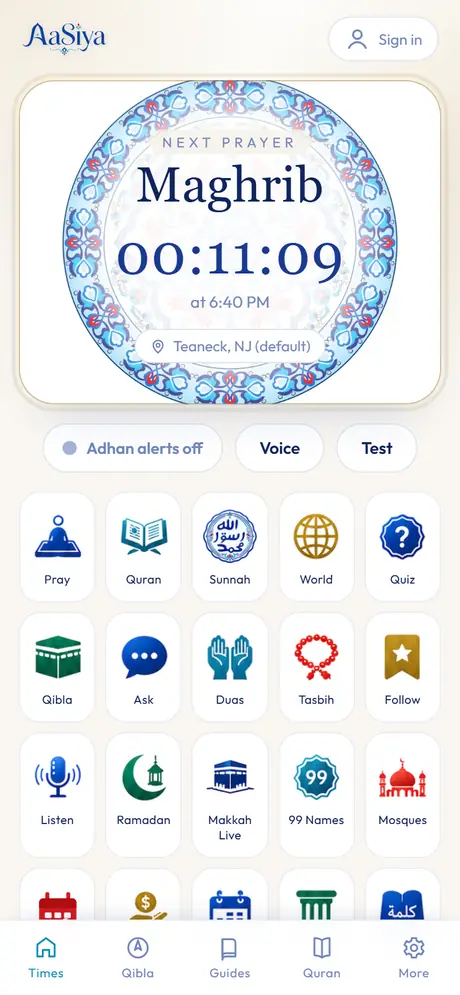
Hear the adhan at every prayer

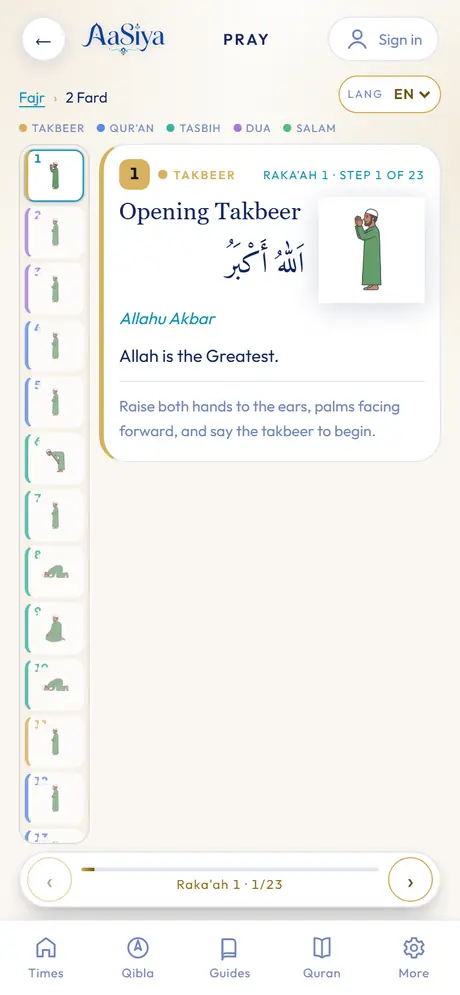
Learn to pray, properly
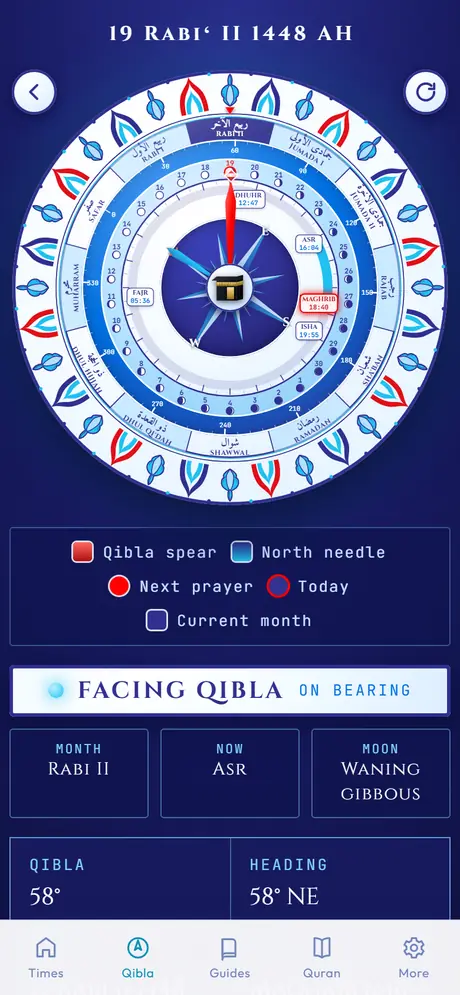
Find the qibla anywhere
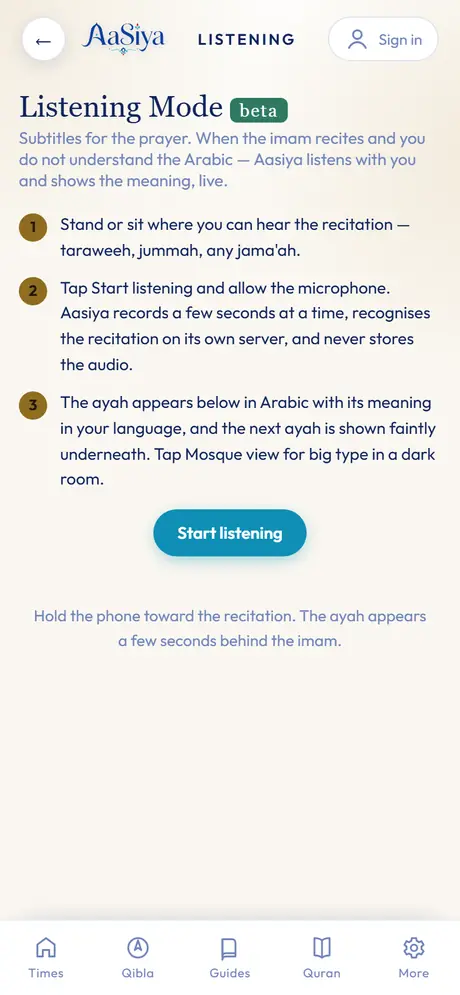
Understand the imam, live
Privacy
Last updated 2026-09-30
Aasiya is free. There is no tracking and there are no third-party ads, we do not sell your data, and there is no third-party analytics in the app. Aasiya may show its own small cards, labelled From the Aasiya team, and counts taps on them as a total only, with nothing about you. Most of Aasiya works without an account, and your prayer times are calculated on your own device. This page explains exactly what we keep, and why.
Your phone number (only if you sign in)
Signing in is optional. When you sign in, we send a one-time code to your phone by text message through an SMS provider. We keep your phone number, the date your account was created and the date you last signed in. A cookie keeps you signed in on that device until you log out.
Prayer log, fasting record and gratitude notes (signed in)
When you are signed in, the prayers you check off, the fasts you record (with the type you choose) and any gratitude notes you write are saved to your account, so they follow you to a new phone. When you are not signed in, your tracker stays in this browser only.
Ask Aasiya
Ask needs you to be signed in. Your question is sent to an AI provider so it can write the answer; your last few messages are sent along with it so the answer makes sense in context. We keep your questions and the answers to show your history, and we count how many questions you ask each day to limit use.
Feedback and reports you send
When you send us something, we keep it so we can read it and act on it: messages from Support or Contact us, the "Was this helpful" buttons under answers, ideas and votes in Shape Aasiya, business applications, and events you post. If you are signed in, your phone number is kept with it so we can follow up.
Your location
Prayer times and the qibla are computed on your device from your location, or from the city or ZIP code you type. That location is saved in your browser. It is sent to our server only when:
- you look up mosques, halal places or events near you. Our server asks OpenStreetMap services for places around that point, and a typed city or ZIP code is looked up through OpenStreetMap's search;
- you turn on prayer notifications. We keep an approximate location with your notification subscription so each alert arrives at the right time for where you are.
Prayer notifications
If you turn on notifications, your browser gives us a push address and keys. We keep them with your location and your calculation settings so we can send an alert at each prayer. Turning notifications off stops them.
Listening Mode
When you tap Start listening, the app records a few seconds at a time and sends them to a speech recognition service on our own server to find the ayah. The audio is held in memory for that one request and is never saved or logged.
Compass reports
If the compass does not work, the app can send a short report so we can fix it: your device and browser type, whether the app is installed, the sensor and permission status, the heading it read and the app version. It does not include your phone number or anything that identifies you.
What loads from elsewhere
- The Makkah Live player loads from YouTube's privacy-enhanced domain, and only when you open Makkah Live.
- Quran recitation audio streams from a public Quran audio service when you press play.
- The app's fonts load from a web font service.
Deleting your data
In the app, go to More, then Delete my account (or email [email protected]). It erases your phone number, settings, prayer log, gratitude journal, Ask history, feedback, idea votes and notification subscriptions. Community posts that were already approved stay up without your number. You can also turn off notifications and log out at any time from More. Clearing this site's data in your browser removes what is stored on your device.
Children
Aasiya is made for a general audience and is not directed at children under 13. We do not knowingly collect personal information from children under 13. If you believe a child has signed in, email us and we will delete the account.
Changes to this page
If what we collect changes, we will update this page and the date at the top.
Contact
Questions about privacy: [email protected]. You can also write to us from the Support page.
Support
Quick answers first. If they do not help, write to us below.
How do I install Aasiya on iPhone?
Open aasiya.com in Safari. Tap the Share button (the square with the arrow), scroll down, tap Add to Home Screen, then Add. Open Aasiya from the new icon. On iPhone, prayer notifications only work when Aasiya is opened from the Home Screen.
How do I install Aasiya on Android?
Open aasiya.com in Chrome. Tap the menu (three dots, top right), then Add to Home screen or Install app, then Install. Aasiya opens like any other app.
The adhan is not sounding
- On Home, tap the Adhan alerts toggle once. Phones only allow sound after a tap.
- Check that the phone is not on silent and the volume is up. Use the Test button to hear it.
- The full adhan plays while Aasiya is open. To be alerted when it is closed, turn on prayer notifications in More.
The compass is not moving
- On iPhone, allow motion access when Aasiya asks. If you said no, close Aasiya fully and open Qibla again.
- Move the phone slowly in a figure eight to calibrate it, away from metal, magnets and phone cases with magnets.
- If the dial stays faded, your phone is not sending compass readings. The number under Qibla still gives the direction in degrees from north.
My sign-in code is not arriving
- Check the number, including the country code for numbers outside the US.
- Wait a minute, then ask for a new code. Some carriers delay texts from short numbers.
- Check whether messages from unknown senders are filtered or blocked on your phone.
- Still nothing? Write to us below and include the number you used.
How do I delete my account?
Email [email protected] with the phone number you signed in with and we will delete your account and everything tied to it. See Privacy for what that includes.
If you are signed in, your phone number is attached so we can reply. Email works too: [email protected].
Ramadan
Makkah Live
The Haram and the Prophet's Mosque, live, right here — see the Kaaba and hear the prayer as it happens.
Zakat Calculator
2.5 percent of qualifying wealth held for one lunar year, if above the nisab.
Update the metal prices to today's rates before calculating. This is a standard calculation — for complex situations (property, retirement funds, agriculture) confirm with your imam or a zakat institution.
Date Converter
Gregorian and Hijri (Umm al-Qura), both directions.
The Five Pillars
The foundations Islam is built upon.
The Six Kalimas
Declarations of faith, glorification and repentance.
Adhan Voice
Choose the voice that calls you to prayer. Tap Preview to hear it.
Ask Aasiya
Questions about prayer, wudu, Quran and the basics of Islam.
Duas & Azkar
Daily supplications with meaning.
99 Names of Allah
Al-Asma ul-Husna — search them, tap any name to see where it appears in the Quran, or test yourself.
Put the phone in front of you and follow along, step by step. Tap anywhere to advance.
Listening Mode beta
Subtitles for the prayer. When the imam recites and you do not understand the Arabic — Aasiya listens with you and shows the meaning, live.
Shape Aasiya
Tell us what to build next. Vote for what matters to you.
For Businesses
Aasiya is free, forever. It is built by a team that automates real businesses — phone agents, ordering, websites, AI workflows.
Put AI to work in your business
Tell us what eats your time — missed calls, bookings, follow-ups — and we will show you what automation can do.
Muslim-owned business? Apply for pro bono work
Every quarter we build something free for a Muslim-owned small business that needs it. Tell us your story.
Admin
Events waiting for review
Post announcement (banner + push to all devices)
All announcements
Masjid calendar feeds
Feedback (Ask thumbs + notes)
Compass reports (last 20 phones)
Business applications
All ideas
How to Pray
Step-by-step guides with recitation, meaning and posture.
About each prayer
Quran
All 114 surahs with recitation. Tap any ayah to hear it.
Tasbih
Tap anywhere in the circle. Cycles at 33.
More
Settings: method, Asr, voice, clockDelete my account
Erased for good: your phone number and sign-in, your synced settings, your prayer and fasting log, your gratitude journal, your Ask Aasiya history, your feedback and idea votes, and your notification subscriptions.
Stays up, without your number: community posts that were already approved, such as an event you posted. Anything you wrote that was still waiting for review is kept in the queue under "deleted".
Prayer times and tracker data saved on this phone stay until you clear this site's data in your browser. This cannot be undone.
Your account was deleted. Your number and personal data are gone from our server, and you are signed out.
Tracker
For days you are excused from prayer or fasting — your streak will not break. Private to you.
Prayer alerts
Notifications arrive even when the app is closed (on iPhone, add Aasiya to your Home Screen first). Adhan audio plays while the app is open.
Settings
Location
Advanced: latitude and longitude
Contact us
Questions, problems, ideas — we read everything.
Text us: 201-970-2580
Help
Free for everyone. Times are calculated on your device with the adhan library — they work offline. Adhan audio plays while the app is open; on iPhone, add the app to your Home Screen and keep it open at prayer time.
Sign in
Free account with your phone number. You stay signed in until you log out.